See your organization's custom issue fields on every sub-issue of an epic and on every row of a Projects view, and who is behind each pull request, right where GitHub shows only the issue type. Read an epic's sub-issues as a kanban board and drag a card to move it.
GitHub organizations can define their own custom issue fields. Each issue shows them in its sidebar, but the Sub-issues list on a parent issue shows only the issue type, and Projects views show only the columns you add by hand. To know a field value for twenty sub-issues you have to open twenty tabs. This extension puts the values you care about directly on each row, on sub-issue lists and on project tables and boards.
Sub-issues2 of 4without the extension
BugSearch results ignore the selected date range#1482
2···
FeatureAdd keyboard shortcuts to the results list#1490
···
TaskMigrate the search index to the new schema#1477
1···
BugFilters reset when switching result pages#1503
1···
Create sub-issue▾
Sub-issues2 of 4with the extension
BugP1: Must HaveSearch results ignore the selected date range#1482
2···
FeatureP1: Must HaveAdd keyboard shortcuts to the results list#1490
···
TaskP2: Should HaveMigrate the search index to the new schema#1477
1···
BugP3: Could HaveFilters reset when switching result pages#1503
1···
Create sub-issue▾
Illustration with an invented repository. The badges show whichever fields you configure; a field named Priority is used here as an example.
Any field, any type
Single-select, multi-select, text, number and date fields all work. Single-select badges use the colour of the chosen option, so a red option stays red.
You pick the fields
Choose which fields to show and in what order on the settings page. One field or five, per your workflow.
One request per page
All visible rows, across repositories, are fetched in batched GitHub GraphQL queries of 60 issues. Results are cached for five minutes.
Projects views too
The same badges appear on GitHub Projects: after the issue number in the table layout, under the title on board cards. A field the view already shows, as a column, a card field or the field the board is grouped by, is skipped so nothing appears twice. Draft items and pull requests are left alone.
Issue age, if you want it
An optional gray badge shows how long ago each issue was created, in months, weeks or days, and turns yellow once an issue has been open longer than a threshold you set, 90 days by default. An issue younger than the unit reads today, this week or this month. Off by default, one checkbox in the settings.
Pull request badges
On the pull request list and on Projects views that contain pull requests: whether the author is a first-time contributor, external, a contributor, a collaborator, a member or a bot, plus optional badges for forks, size and merge state.
Who is already busy
A mark after a username on an issue or pull request says what that person holds in the organization: a dot when there is room, a count of assigned issues over open pull requests when there is not. Hovering lists the issues, each with the pull request that closes it. Off by default.
Epics as a board
An issue with sub-issues gets a List and Kanban toggle. The board groups the sub-issues by any field they carry, orders each column by another, filters everything down to one value of a third, and hides the closed ones on request. Drag a card to another column and the field value, or the issue state, is written back to GitHub.
Sidebar out of the way
A chevron in the gutter hides an issue's whole metadata column, and the issue body and the board take the width. It holds on every issue until you press it again, and a setting can hide just the Projects section instead.
Search from the address bar
Type @gh, a space, a shortcut and a few words: @gh repo web lists the repositories, issues or pull requests that match as you type. Each shortcut adds its own GitHub qualifiers, such as org:acme, and repository names match on any part of the name.
Pinned epics
A pin button in GitHub's top bar keeps your epics one click away: copy their reference, or make the issue you are looking at a sub-issue of one. Optional as well.
Clickable
Each badge links to the repository's issue search filtered by that field value, the same way GitHub's own field badges do.
Looks native
Badges reuse GitHub's own colour tokens, so they match light and dark themes and every colour blindness setting GitHub offers.
Private by design
No analytics, no third-party servers. Your token stays in your browser and only ever talks to api.github.com. The only write is the sub-issue link you trigger yourself.
Examples
The same badges follow you to Projects views, an optional age badge tells you how long an issue has been open, and the pinned issues panel keeps your epics one click away. Illustrations of an invented repository, with a field named Priority as the example.
Projects table view
Badges come right after the issue number in the title cell, so a table needs no extra columns. Fields that already have a column in the view are not repeated.
Title
Status
Assignees
Labels
1
Search results ignore the selected date range#1482P1: Must Have7 mo
In progress
area/search
2
Add keyboard shortcuts to the results list#1490P1: Must Have5 mo
Backlog
area/search
3
Migrate the search index to the new schema#1477P2: Should Have9 mo
Done
area/search
4
Highlight matched terms in result snippets#1511P3: Could Havethis month
Backlog
area/search
Projects board view
On board cards the badges sit under the title. The age badge is the gray one, shown here enabled.
Backlog 2···
acme/webapp #1490
Add keyboard shortcuts to the results list
P1: Must Have5 mo
area/search
acme/webapp #1511
Highlight matched terms in result snippets
P3: Could Havethis month
area/searchgood first issue
+ Add item
In progress 1···
acme/webapp #1482
Search results ignore the selected date range
P1: Must Have3.27 mo
bugarea/search
+ Add item
Epic kanban
On an issue with sub-issues, the toggle above the list swaps it for a board. You choose the field that forms the columns, the field that orders the cards inside each one, and a value to filter everything down to, and a Hide closed checkbox takes the finished sub-issues off the board; the columns follow the order your organization gave the field's options. Dragging a card to another column writes the new value back to GitHub.
Off by default. When enabled, a gray badge shows how long ago the issue was created, in months, weeks or days; past a configurable age, 90 days by default, it turns yellow. An issue younger than the unit reads today, this week or this month. Hovering gives the exact age and the creation date.
Sub-issues1 of 3
BugP1: Must Have7 moSearch results ignore the selected date range#1482
2···
FeatureP2: Should Have3wAdd keyboard shortcuts to the results list#1490
···
TaskP3: Could Have98dMigrate the search index to the new schema#1477
1···
Months, weeks and days shown side by side; in practice one unit applies to every row. The first row is past the 90-day threshold.
Pull request list
Badges sit among the labels of each row, and on Projects views they follow the pull request into table cells and board cards. The author's relation to the repository is on by default; fork, size and merge state are optional.
Add retry policy to the webhook senderarea/backendFirst-time contributorFrom fork+231-13Behind base
#1521 opened 2 days ago by t-nakamura
✓●
Keyboard shortcuts for the results listarea/searchenhancementMember+539-69Mergeable
#1518 opened 3 days ago by m.ortega
✓
Migrate the search index to the new schemaarea/searchContributor+1204-877
#1509 opened last week by priya-s · Draft
✕
chore(deps): bump vite from 6.1.0 to 6.2.1dependenciesBot+4-4Conflicts
#1503 opened last week by dependabot
✓
All four badge kinds enabled here for the illustration; only the author badge is on by default.
Contributor load
A mark after a username on an issue or pull request. An outlined dot is nothing assigned in this organization, a filled dot is at or under the limit, and a count appears above it, reading assigned over open pull requests. The count fills in when that second number is zero. Hovering it lists what the person holds, each line carrying the pull request that closes it when there is one.
t-nakamura3 hours agoI would like to take this one.
priya-s2 hours agoCan you assign this to me?
m.ortega4/3an hour agoHappy to pick this up as well.
a-whitfield3/032 minutes agoAssign me please.
m.ortega4 assigned · 3 open PRs
webapp#1521PR #1544
Retry policy is never applied to the webhook sender
webapp#1498
Keyboard shortcuts stop working after the results list reloads
docs#312PR #318
Install page still points at the old package name
The card belongs to the third row. The limit is 1 here, so the first two need no number.
Address bar search
Type @gh and a space in the address bar, then a shortcut and a few words. The first row searches GitHub with them, the others open a match directly. Each issue and pull request carries its state, author and last update, each repository its description and last push.
GitHub Issue Toolkitpr retry
Search pull requests in org:acme is:open forretry
🔀acme/webapp#1521Add retry policy to the webhook senderopen · t-nakamura · updated 2d ago
🔀acme/webapp#1530Retry failed exports once the storage is backdraft · priya-s · updated 5h ago
🔀acme/docs#318Document the retry settings of the webhook senderopen · m.ortega · updated 1w ago
A pr shortcut with the qualifiers org:acme is:open and the 🔀 icon. Chrome draws the address bar and the magnifiers; the rows are the extension's.
Every badge at a glance
Colours follow GitHub's own tokens, so they adapt to light and dark themes. Green invites a look, yellow means attention, red means work, blue is trust, gray is neutral information.
Pull request author
First-time contributorFirst PR on GitHubExternalContributorCollaboratorMemberOwnerBot
Contributor load: nothing assigned, within the limit, over it, over it with nothing pushed, not readable
4/33/0
Custom field values, one colour per option
RedOrangeYellowGreenBluePurplePinkGray
Issue types in the pinned issues panel
EpicBugFeatureTask
Pinned issues
The pin button sits next to the notifications bell with the number of pins. The dropdown lists your epics with their type; Link makes the issue you are looking at a sub-issue of one, Copy puts its reference on the clipboard.
3
Pinned issues×
Current: acme/webapp#1511
Epic[Epic] Search improvements
acme/webapp#1450LinkCopy×
Epic[Epic] Onboarding redesign
acme/webapp#1320LinkCopy×
Epic[Epic] Notifications overhaul
acme/webapp#1205LinkCopy×
Issue URL or owner/repo#123Pin
acme/webapp#1511 is now a sub-issue of acme/webapp#1450.
Closed epics stay pinned, struck through. Link is disabled on the epic you are currently viewing.
How it works
A handful of plain files, no build step, one code base for Chromium and Firefox. The extension never scrapes the field values from the page, because organization-only fields are not in the HTML. It asks the GitHub API instead.
Detect the rows
A content script on github.com watches the page for sub-issue lists, project table rows and board cards, and collects the issue links: owner, repository, number.
One batched query
The background script (a service worker on Chromium, an event page on Firefox) groups those issues by repository and runs one GraphQL query per batch of 60 using Issue.issueFieldValues and createdAt, with your token. Pull request lists get the same treatment with authorAssociation, size and mergeStateStatus.
Keep what you chose
From the returned values it keeps only the fields you configured, in your order, and hands back field, value, colour and the creation date per issue.
Or draw a board
When the kanban toggle is on, the sub-issues of the open issue are read in one subIssues query with every field value they carry, and drawn as columns in place of the list. Grouping, ordering and filtering happen in the page, so switching any of them is instant. Dropping a card in another column is the one write: createIssueFieldValue for a field, closeIssue or reopenIssue for the state, with the card moving back if GitHub refuses.
Or ask about a person
With the contributor load mark on, hovering a username runs two search queries in one request: the open issues assigned to that login in the organization, and the open pull requests they authored, with closingIssuesReferences pairing each issue with the pull request that closes it. Nothing is read until you hover, and each person is cached for ten minutes.
Or search from the address bar
After the @gh keyword, the first word picks a shortcut and the rest is sent, with that shortcut's qualifiers, to GitHub search as you type. For repositories inside an org: or user:, the owner's repository list is read once and matched in the background script, which is what lets part of a name match.
Render badges
The content script inserts a badge per value right after the issue type badge, after the issue number in project tables, or under the title on board cards, plus the age badge when enabled. It re-renders when GitHub redraws the page.
{ r0: repository(owner: "org", name: "repo") {
    i7700: issue(number: 7700) {
      issueFieldValues(first: 30) { nodes {
        ... on IssueFieldSingleSelectValue { name color field { ... on IssueFieldSingleSelect { name } } }
        ... on IssueFieldTextValue         { value      field { ... on IssueFieldText         { name } } }
        # number, date and multi-select values follow the same shape
      } }
    }
    # one alias per visible sub-issue, one repository block per repository
} }
The query above is what the background script sends, one such request per 60 issues. GitHub's GraphQL rate limit is 5,000 points per hour per token; a page with fifty sub-issues costs one point.
Install
The extension is plain files with no build step. It runs in every Chromium-based browser and in Firefox.
Enable developer mode Open chrome://extensions (edge://extensions, brave://extensions, and so on) and switch on Developer mode.
Load unpacked Click Load unpacked and select the unzipped folder. The icon appears in the toolbar.
Open the settings Click the toolbar icon, or Details then Extension options.
Firefox (140 or newer)
Get the Firefox package Download github-issue-toolkit-<version>-firefox.zip from the releases page, or build it with scripts/package.sh.
Load it Open about:debugging#/runtime/this-firefox, click Load Temporary Add-on, pick the zip. Temporary add-ons are removed when Firefox restarts; a permanent install needs a package signed by Mozilla.
Allow site access Open the settings from the toolbar icon and click Allow access to github.com. Firefox asks for this separately from the installation.
Safari is not supported: it needs Apple's converter, an Xcode project and a developer account. Other browsers that implement Manifest V3 WebExtensions should work with one of the two manifests, since the code uses the browser namespace when present and falls back to chrome.
The GitHub token
Custom fields are usually set to "Organization only" visibility, so GitHub returns them only to a token of an organization member. The extension needs read access to issues. Write access is needed only if you want to link issues to pinned epics from the panel.
If your organization enforces SSO, click Configure SSO next to the new token and authorize it for the organization. Without this step organization-only fields come back empty.
Give it a note such as github-issue-toolkit so you recognise it later.
Pick the repositories you browse, or all repositories.
Under Repository permissions set Issues to Read-only, or Read and write if you want to link issues to pinned epics. GitHub adds Metadata: Read-only automatically.
Paste the token on the settings page and click Test token. It confirms which account the token belongs to before anything is saved.
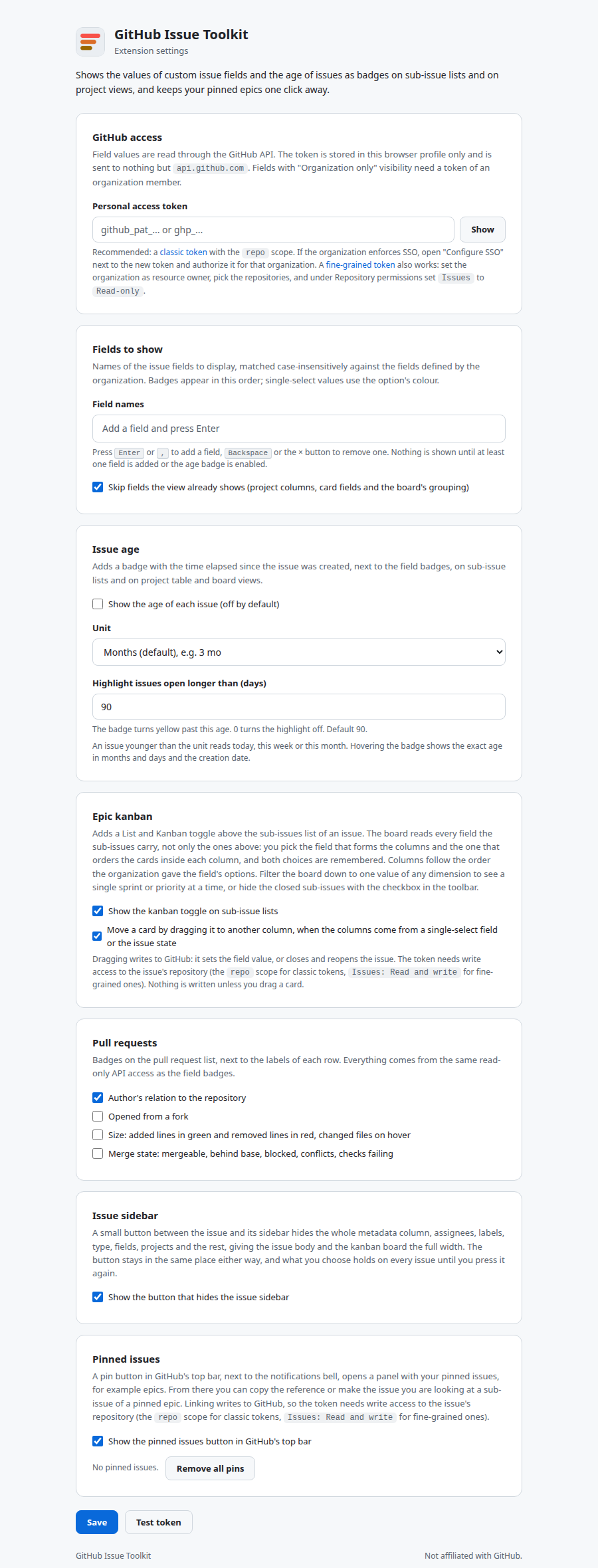
Settings
The token is the one essential; the fields to show, the age badge, the pull request badges, the contributor load mark, the epic kanban toggle, the sidebar button, hiding the sidebar's Projects section, the pinned issues button and the address bar search shortcuts are optional extras with their own cards. Each field is a chip. Press Enter or , to add one, Backspace or the × button to remove one. Names are matched case-insensitively against the fields your organization defines, and badges appear in the order of the chips. Leave the fields empty and no field badges are shown, while the rest of the extension keeps working.
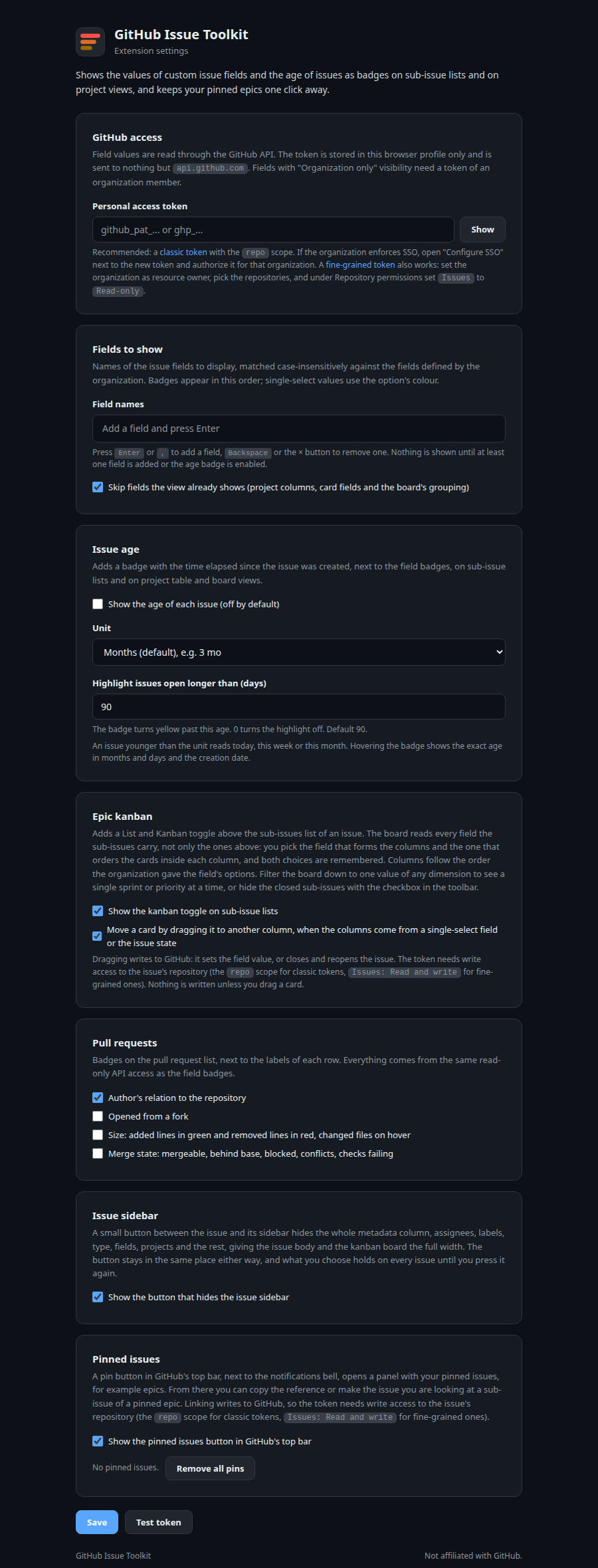
The settings page follows your browser theme, light or dark.
Pinned issues
Triaging a backlog usually means linking many issues to a handful of epics. The pin button in GitHub's top bar, next to the notifications bell, keeps those epics at hand. See the illustration above.
Pin
Pin the issue you are looking at, the item open in a project side panel, or paste an issue URL or owner/repo#123. Each pin shows its type and title.
Link
One click makes the current issue a sub-issue of the pinned epic through GitHub's addSubIssue mutation. If the issue already has another parent, you are asked before it is moved.
Copy
Copies owner/repo#123 to the clipboard, ready to paste into a comment or a task list.
Pins are stored locally in your browser and shared across tabs; the open or closed state of the panel is per tab. A red dot on the button means the last request failed, for example because no token is set yet. The whole feature can be switched off in the settings.
Privacy
What is stored
Your token, your field list, your preferences and your pinned issues, in chrome.storage.local, on your device. Uninstalling removes all of it.
What is sent
Repository owner, name and issue number of the issues on the page you are viewing, to api.github.com, with your token in the header. With the contributor load mark on, the login you hover and the organization of the page. After the @gh keyword in the address bar, the words you type and the shortcut's qualifiers. The only writes are the sub-issue link you click and the card you drag on the board. Nothing else, to no one else.
What is not
No analytics, telemetry, crash reports, cookies or third-party services. The full policy is in PRIVACY.md.
FAQ
Why does it need a token at all?
Because organization-only field values are not in the page HTML; GitHub loads them through its authenticated API only for members. A token is the only way an extension can read them. If your organization sets fields to "Public" visibility, a token is still required by the API, but any account's token will do.
Where exactly do the badges appear?
On the sub-issues list of an issue page, including nested sub-issues once you expand them, and on GitHub Projects views: table rows and board cards. Not on the plain issues list, where GitHub already shows pinned field values.
What do the pull request badges mean?
First-time contributor is the author's first pull request to this repository, First PR on GitHub their first anywhere, External someone with no previous contribution here, Contributor someone with merged work, Collaborator someone with write access, Member an organization member, Bot an app. The optional badges show a fork origin, added lines in green and removed lines in red, and the merge state GitHub reports: mergeable, behind base, blocked by rules, conflicts, or failing checks.
Can I move a card on the kanban board?
Yes, when the columns come from a single-select field or from the issue state: dragging a card writes the new field value, or closes and reopens the issue, through the GitHub API; an issue closed as not planned is closed that way again. Dropping it in the "No field" column clears the value. Columns made of types or assignees are not drop targets, and cards there cannot be dragged. Dragging needs a token with write access; it can be switched off in the settings, and nothing is ever written unless you drag.
Can I see only one sprint, or only the P1 issues?
Yes. The Filter control keeps one value of any dimension, the same ones the columns can be made of, and the count in the toolbar says how many of the epic's sub-issues are left. Filtering happens in the page, so the columns stay as they are and switching back costs nothing.
Can I hide the done sub-issues?
Yes. The Hide closed checkbox in the toolbar takes every closed sub-issue off the board, whatever the columns are made of, and the count in the toolbar says how many are left. The choice is remembered like the others. With the columns made of the issue state, the empty Closed column stays, so a card can still be dragged there to close it.
Why does a username get a mark only after I hover it?
Because each mark is a query about one person. Reading every name on a long thread up front would spend requests on people you never meant to look at, so the contributor load mark waits for you to rest on a name. Your own name never gets one. A red outlined dot means the read failed, usually because no token is set; hovering the name again retries.
Which issues does the contributor count include?
Open issues assigned to that person in the organization of the page, and open pull requests they authored there, as GitHub search returns them for your token. A repository your token cannot read is left out, so a fine-grained token limited to a few repositories counts only those. The pull request shown next to an issue comes from GitHub's own link between them, not from closing keywords.
Why @gh and not a keyword of my own, such as @acme?
A browser gives an extension one address bar keyword, fixed when it is installed, and keeps the @ list for its own shortcuts. So the keyword is @gh and your shortcuts come right after it: @gh acme flow with a shortcut named acme. Text that starts with no shortcut name goes to the default one.
The kanban board says the epic has more sub-issues than it shows.
The board loads up to 500 sub-issues, in pages of 100. Beyond that the count in the toolbar reads "500 of 640" and the rest is left out.
Where does the sidebar go when I hide it?
Nowhere: the extension sets display: none on GitHub's metadata column, the same thing GitHub does when its own artifacts panel opens, and its content area grows into the space by itself. The chevron stays in the gutter, so pressing it again brings the sidebar straight back. Nothing is changed on GitHub's side and nothing is sent anywhere.
Can I hide only the Projects box in the sidebar?
Yes. Tick Hide the Projects section of the issue sidebar on the settings page and GitHub's Projects section, with its status and project fields, disappears from every issue while assignees, labels, fields and the rest stay. The issue is not removed from any project, and unticking it brings the section back. Off by default.
Does linking need extra permissions?
Yes. Making an issue a sub-issue of a pinned epic writes to GitHub, so the token needs write access to the issue's repository: the repo scope on a classic token, or Issues: Read and write on a fine-grained one. Badges alone work with read-only access.
Sub-issues live in several repositories. Does that work?
Yes. Rows are grouped by repository and fetched in one query. Each badge links to the search in its own repository.
A field shows no badge on some rows.
Those issues simply have no value for that field. Check the field name on the settings page matches the organization's field name; matching is case-insensitive but the full name must match.
Badges did not update after I changed a field on GitHub.
Values are cached for five minutes per issue. Reload the page after that, or change any setting to clear the cache immediately.
Which browsers are supported?
Every Chromium-based browser with Manifest V3 support: Chrome, Edge, Brave, Opera, Vivaldi, Arc. Firefox 140 or newer, using its own manifest that ships in the repository. Safari is not supported.
Firefox shows no badges after installing.
Firefox treats site access as an optional permission. Open the settings page and click Allow access to github.com, or use the extensions (puzzle) button in the toolbar and allow the extension on github.com. Badges appear on the next page load.
Is it affiliated with GitHub?
No. It is an independent open-source project under the MIT license. GitHub is a trademark of GitHub, Inc.